Writing emails at work is rarely about perfect English. It is about clarity, tone, hierarchy, and intent.
Most professionals do not struggle because they lack vocabulary. They struggle because emails need to sound:
- Polite but firm
- Clear but not blunt
- Efficient without sounding rude
This guide provides practical email writing templates commonly used in professional environments. Each template focuses on purpose, tone, and structure, so you can adapt them without sounding robotic or overly formal.
Why Email Templates Matter in Professional Communication
In corporate environments, emails are often:
- Forwarded
- Replied to out of context
- Read quickly
- Interpreted politically
Templates help by:
- Reducing ambiguity
- Maintaining a consistent tone
- Preventing unnecessary escalation
- Saving time and mental energy
They are not scripts. They are starting points that help you communicate clearly without overthinking every sentence.
Core Principles Behind Good Professional Emails
Before using any template, keep these principles in mind.
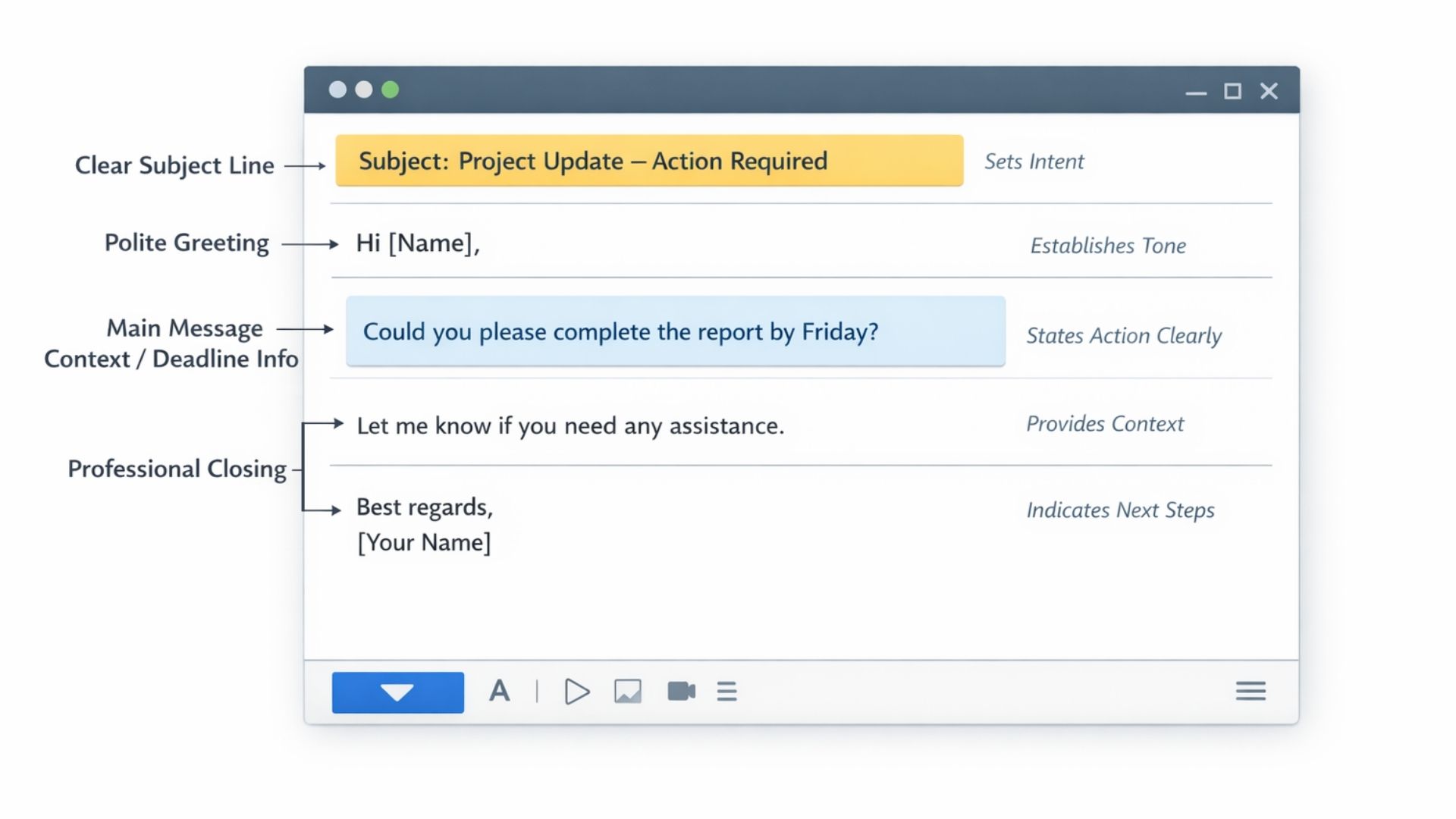
- The subject line should reflect the action or purpose
- The opening sets tone and hierarchy
- The body should focus on one main objective
- The closing should signal next steps or closure
Good emails are not long. They are intentional.
Template 1: Requesting Information
When to use
You need details, data, or clarification from a colleague or external party.
Template
Hi [Name],
Could you please share the details regarding [specific item]? This will help us proceed with the next steps.
Thank you.
Best regards,
[Your Name]
Why this works
- Polite without being weak
- Clear request
- Explains why the information is needed
Template 2: Following Up on a Previous Email
When to use
You have not received a response and need to check progress.
Template
Hi [Name],
Just following up on my earlier email below regarding [topic]. Let me know if you need anything further from my side.
Thanks.
Best regards,
[Your Name]
Tone note
“Just following up” sounds soft, but it signals expectation. Context determines how much pressure it carries.
Template 3: Assigning a Task (Neutral, Professional)
When to use
You need someone to complete a specific task.
Template
Hi [Name],
Could you please assist with [task] and aim to complete this by [date]? Let me know if you foresee any issues.
Thank you.
Best regards,
[Your Name]
Why this works
- Clear deadline
- Invites early feedback
- Avoids sounding like an order unless hierarchy allows it
Template 4: Assigning a Task (Direct, Top-Down)
When to use
You are communicating downward in the hierarchy and clarity matters more than softness.
Template
Hi [Name],
Please complete [task] by [date].
Thanks.
[Your Name]
Tone note
Short does not mean rude. In professional settings, brevity often signals authority and efficiency.
Template 5: Asking for Approval
When to use
You need confirmation before proceeding.
Template
Hi [Name],
Could you please confirm if I should proceed with [action]? Once approved, I will move forward accordingly.
Thank you.
Best regards,
[Your Name]
Why this works
- Clearly pauses action
- Shifts responsibility upward
- Prevents misalignment later
Template 6: Providing an Update
When to use
You need to inform stakeholders of progress.
Template
Hi [Name],
Sharing a quick update on [project]. We have completed [milestone], and the next step is [next action].
I will keep you posted as we move forward.
Best regards,
[Your Name]
Why this works
- Structured
- Reassuring
- Shows momentum
Template 7: Raising a Concern
When to use
You need to highlight a risk, delay, or issue without sounding alarmist.
Template
Hi [Name],
I wanted to flag a potential issue regarding [topic]. There may be an impact on [area] if this is not addressed.
Let me know how you would like to proceed.
Best regards,
[Your Name]
Tone note
“Flagging” sounds neutral, but it often signals responsibility shifting.
Template 8: Declining a Request Politely
When to use
You cannot agree to a request but want to maintain the relationship.
Template
Hi [Name],
Thank you for reaching out. Unfortunately, I will not be able to support this at the moment due to [brief reason].
Happy to revisit this at a later stage if needed.
Best regards,
[Your Name]
Why this works
- Polite but clear
- Does not over-explain
- Leaves the door open
Template 9: Scheduling a Meeting
When to use
You need discussion rather than back-and-forth emails.
Template
Hi [Name],
Would you be available for a short meeting to discuss [topic]? Please let me know your availability over the next few days.
Thanks.
Best regards,
[Your Name]
Reality check
“Short meeting” often means a full discussion. Setting expectations later helps.
Template 10: Closing an Email Clearly
When to use
You want to end an email without ambiguity.
Common Closings
- “Please let me know if you have any questions.”
- “Happy to discuss further if needed.”
- “Let me know how you would like to proceed.”
Closings often carry tone. Some signal openness, others signal closure.
How Hierarchy Affects Email Tone
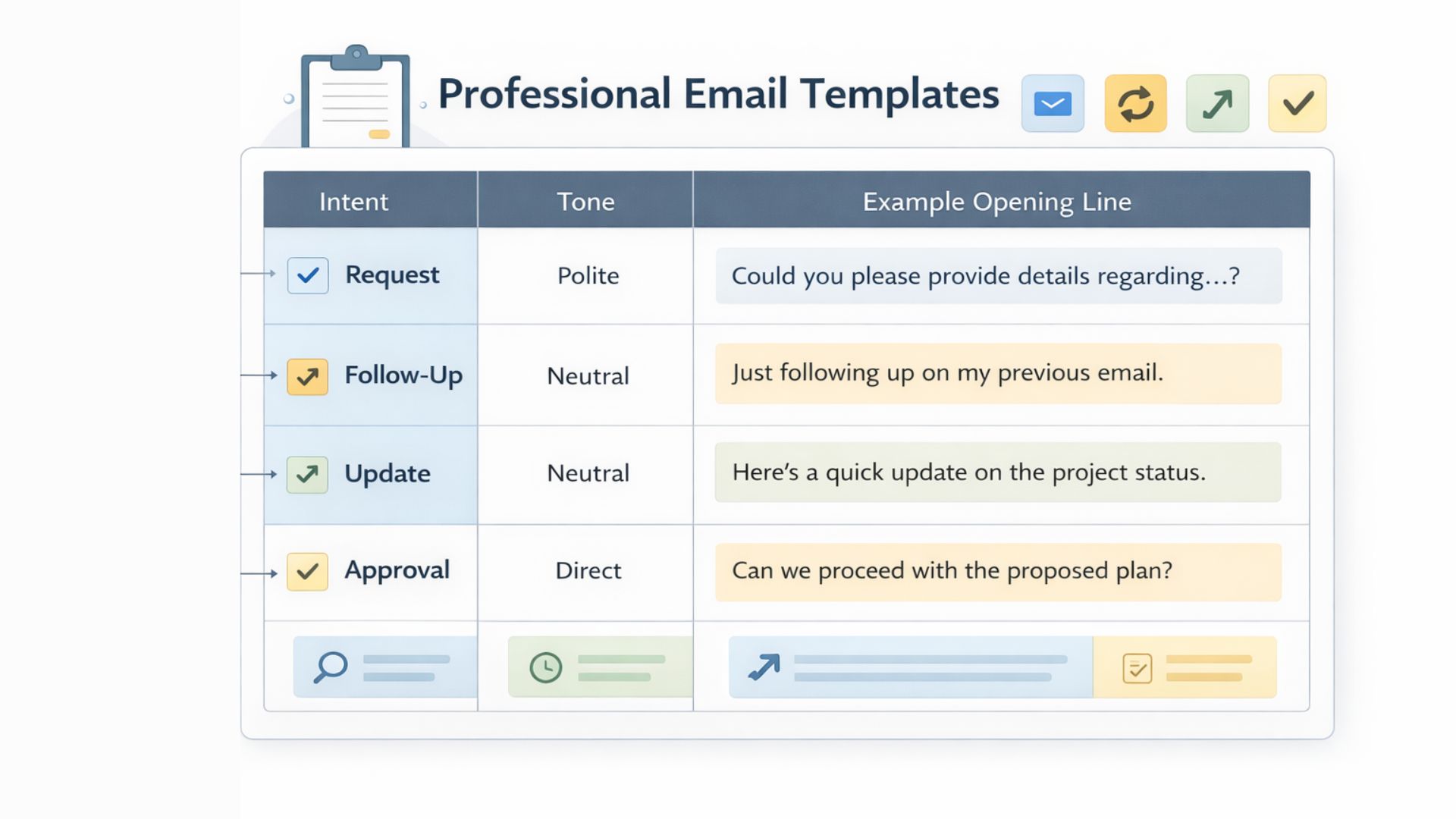
Professional emails reflect organisational structure.
- Upward emails tend to be warmer and more tentative
- Downward emails tend to be direct and task-oriented
- Peer emails balance politeness with efficiency
Templates should be adjusted based on who you are writing to, not just what you are writing.
Why Templates Reduce Email Stress
Templates:
- Reduce decision fatigue
- Prevent over-polishing
- Keep communication consistent
- Help non-native speakers sound confident
They also make it easier to spot when language carries hidden pressure or passive aggression, which is explored further in guides explaining corporate email phrases and their real meaning.
How to Adapt Templates Without Sounding Robotic
Use templates as a base, then:
- Adjust the greeting
- Modify the closing
- Add context where necessary
Avoid copying templates word-for-word repeatedly. Familiarity should feel human, not scripted.
Final Thoughts
Professional email writing is less about perfect English and more about clear intent delivered with the right tone.
Clear writing comes from understanding both language and context. At Read, the focus is on helping learners navigate everyday professional English with clarity and confidence.
Templates provide structure, but understanding how language signals hierarchy, urgency, and responsibility helps you use them effectively.
With the right templates, emails become easier to write, easier to read, and far less emotionally draining.
Once the structure is clear, the words stop feeling heavy, even when the work behind them is not.